USB devices started life as the shiny new way to store and swap files in the early 2000s, back when everyone was showing off their thumb drives like collectible merch.


Attackers clocked the opportunity almost immediately.
That once-harmless, sometimes cute gadget is now one of the most underrated physical attack vectors in the modern threat landscape. Load it with BadUSB firmware, hide a HID-based payload inside, and it becomes a ready-to-go foothold capable of executing commands, impersonating trusted hardware, or siphoning data before anyone notices.
And that’s why you need to treat every USB like it’s a suspicious alien artefact from a sci-fi thriller: interesting to look at, dangerous to touch unless you know exactly where it came from. Let’s get into it.
Table of Contents
Understanding USB-Based cyber attacks
Attackers leverage USB devices to spread malware, steal sensitive data, and compromise entire networks. Before we get into the meat of the topic, it’s worth understanding the different types of USB attacks that you should be aware of if you’re putting together a strong defense and rapid detection strategy.
6 Common USB attack techniques
-
Malware injection: Attackers infect USB drives with malware, which is automatically executed when the device is connected to a system.
-
Keystroke injection: USB devices masquerading as keyboards inject commands into the system to download malware or alter system settings.
-
Data theft: Sensitive data is exfiltrated via USB drives, often without raising alarms.
-
BadUSB: A sophisticated attack where the USB device’s firmware is reprogrammed to behave maliciously, bypassing traditional defenses.
-
USB worms: Malware that spreads across systems once an infected USB is inserted into a machine.
-
USB drop attack: A method where an infected USB drive is dropped in a public area, hoping a user will pick it up and connect it to their device, triggering malware execution.
USB attack detection techniques you need to know
Detecting USB-based attacks requires the use of a multi-layered approach, including traditional cybersecurity tools and methods specifically designed to monitor physical device interactions.
1. Log analysis
Log analysis is the first line of defense in detecting suspicious USB activity. Logs capture details about USB device connections, disconnections, file transfers, and more.
What to look for:
-
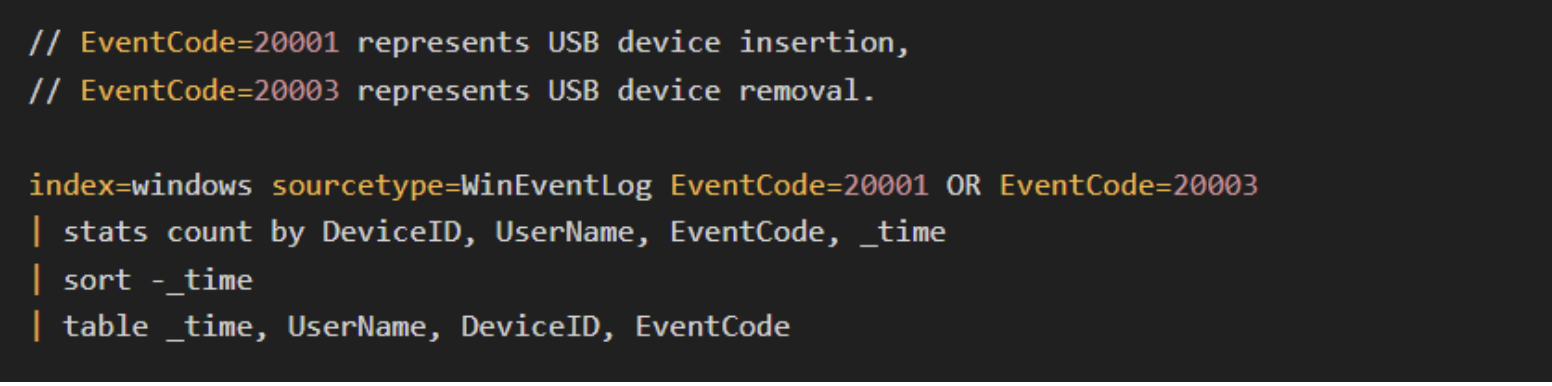
USB device insertions and removals.
Example Splunk query:
-
Suspicious file executions after USB connection.
Example Splunk query:
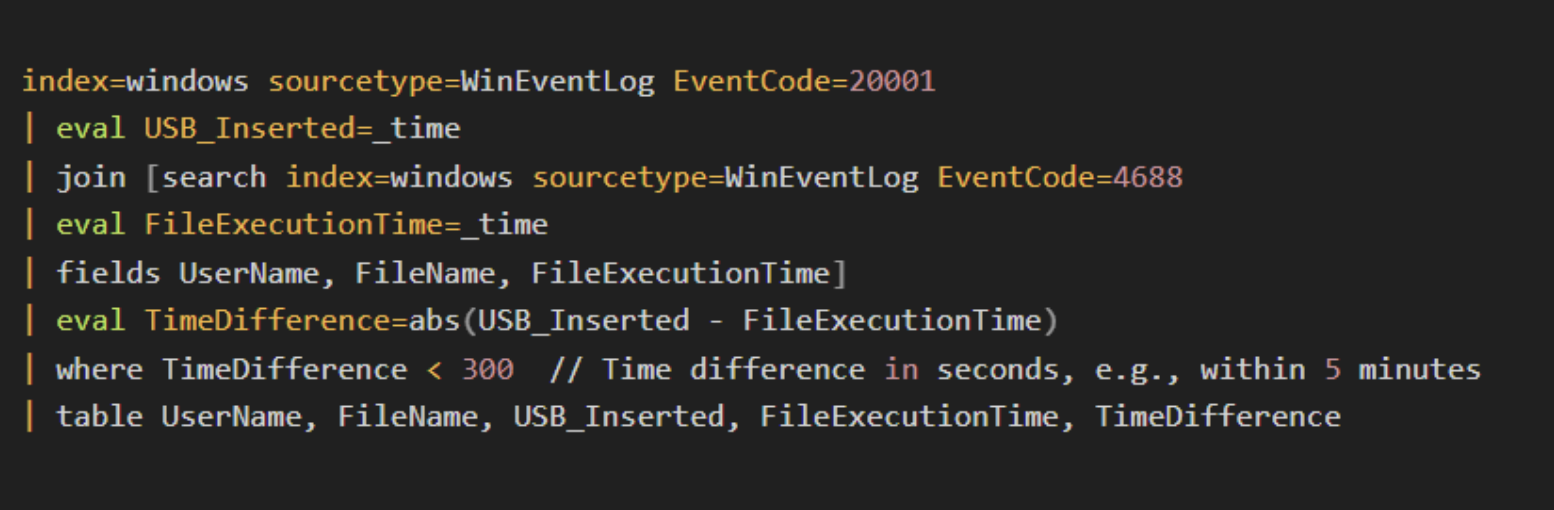
Log patterns showing repeated connections from the same device or large file transfers may indicate data exfiltration or malware activity.
2. Behavioral analysis
Behavioral analysis focuses on deviations from normal user or system behavior related to USB device usage. Monitoring anomalies such as unusual times of USB device use or atypical file transfers can indicate an attack.
What to look for:
-
Unusual times of USB activity (e.g., after work hours).
-
Users connecting unfamiliar devices.
-
Large data transfers shortly after USB connection.
Example Splunk query:
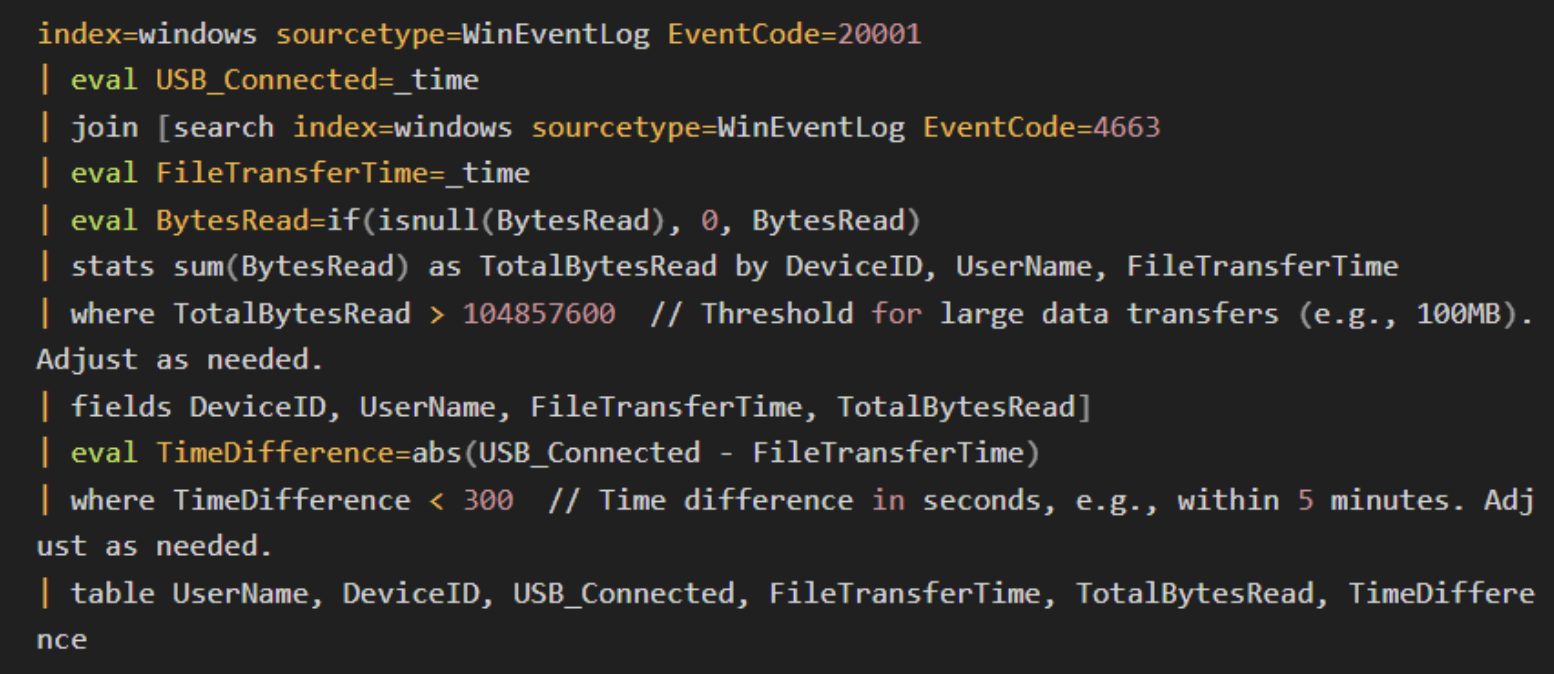
Unusual USB activity, including spikes in use during off-hours or large volumes of data transfers, could signal a potential attack.
3. Network traffic analysis
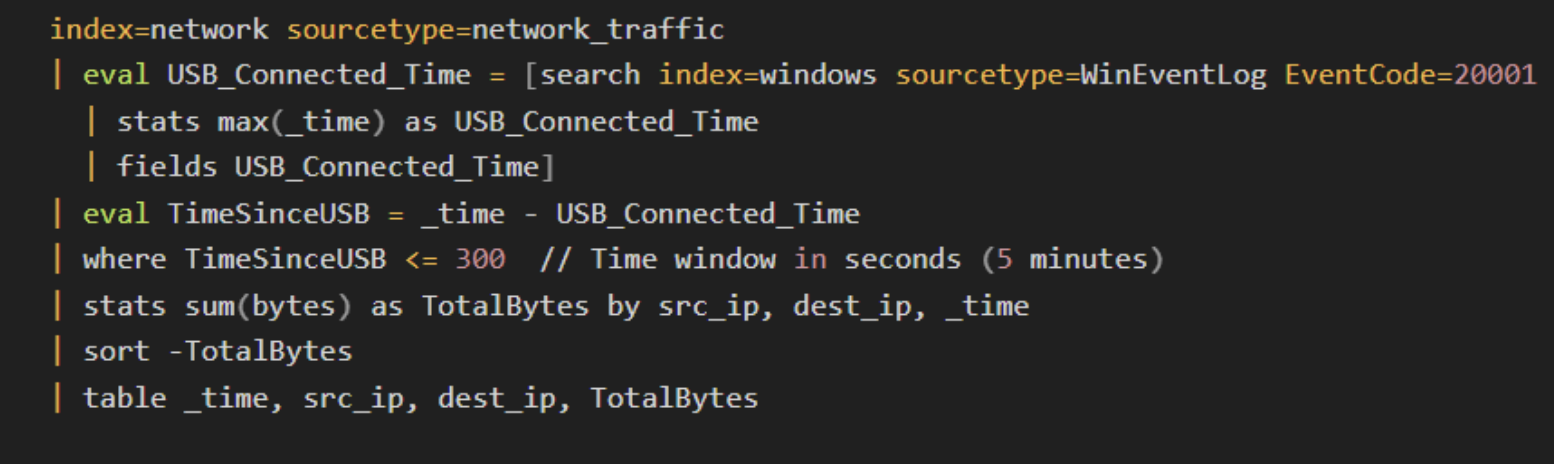
Network traffic analysis identifies unusual outbound traffic that may occur following the insertion of a malicious USB device. This is especially useful for detecting data exfiltration or malware that communicates with external servers.
What to look for:
-
Spikes in outbound network traffic shortly after a USB device is connected.
-
Data transfers to suspicious IP addresses.
-
Communication with command-and-control (C2) servers.
Remember, a sudden surge in outbound traffic following a USB connection often suggests data theft or malware communication with external servers.
4. Endpoint Detection and Response (EDR)
EDR tools continuously monitor endpoints for suspicious activities, including USB device interactions. They provide real-time alerts, automated responses, and forensic data collection.
3 Key EDR features:
-
Real-time alerts for USB-based anomalies.
-
Automated isolation of compromised devices.
-
Centralized logging of USB events for further analysis.
EDR tools are indispensable for real-time detection and automated response, particularly in isolating infected endpoints from the network to prevent further spread.
5. Device whitelisting
Device whitelisting restricts USB access to only authorized devices. This limits exposure to rogue or malicious devices.
How to implement:
-
Maintain a list of approved USB devices with unique identifiers.
-
Block non-whitelisted devices from connecting to systems.
-
Monitor and alert on unauthorized device connection attempts.
Whitelisting USB devices dramatically reduces the risk of malware introduction or unauthorized data transfers.
6. Anomaly detection
Anomaly detection algorithms leverage machine learning to detect deviations in USB usage patterns, such as unusually large data transfers or the connection of unfamiliar devices.
What to look for:
-
Deviation in data transfer sizes or file types.
-
Unusual patterns of USB usage on sensitive systems.
-
USB use that doesn't match historical behavior.
Anomaly detection is particularly effective for spotting subtle, long-term attacks such as slow data exfiltration or advanced malware infections.
7. Access control policies
Strict access control policies define which users can access USB devices and under what conditions. On this front, here are some best practices to keep in mind:
-
Implement role-based access control (RBAC) to restrict USB use.
-
Alert on any unauthorized attempts to use USB devices.
-
Enforce policies that allow USB device usage only on a need-to-use basis.
Strong access controls reduce insider threats and limit opportunities for malicious USB activity.
8. USB port control and physical security
USB port control limits or disables physical access to USB ports on sensitive systems, reducing the attack surface. Physical security methods such as tamper-evident seals and locks further enhance protection. These methods include:
-
Disable USB ports on critical systems.
-
Use port-blocking software to manage which USB ports are active.
-
Implement physical locks on USB ports to prevent unauthorized access.
By limiting USB access at a physical level, organizations can significantly reduce the risk of USB-based attacks, especially in environments where security is paramount.
USB forensics: How to investigate USB-based attacks
When a USB-based attack occurs, forensic analysis is crucial for understanding the scope of the breach, identifying the attack vector, and determining how to prevent future incidents. USB forensics involves gathering and analyzing data from the compromised system to trace the activity of the USB device and reconstruct the attack timeline.
USB forensics: 4 key steps
1. Collecting USB artifacts
Operating systems record various USB-related events. Forensic investigators can retrieve these artifacts to piece together what devices were connected, when, and how they were used.
-
Windows event logs: Windows maintains logs for USB devices, including timestamps for when devices are inserted and removed.
-
Registry entries: Windows stores details about connected USB devices in the Registry, including device names, serial numbers, and last connection times.
-
MAC times: (Modified, Accessed, Created times) Files accessed via USB devices can provide clues about what data was stolen or modified.
2. Analyzing USB metadata
USB devices store metadata such as serial numbers, device IDs, and manufacturer details. This information helps investigators identify specific devices used in the attack.
-
USBSTOR entries: These registry entries list all USB devices that have been connected to the system, including their unique identifiers.
-
Volume serial numbers: These numbers allow investigators to track which files were copied to or from the USB device.
3. Tracking file transfers
Forensic analysis tools such as Autopsy or EnCase can track files that were accessed, copied, or modified via a USB device. This is critical for determining the extent of data theft.
-
Shadow copy analysis: Analyzing shadow copies of files can help retrieve deleted data that was transferred to USB devices.
-
File history and prefetch files: These artifacts can show when files were last accessed, even if they have been deleted.
4. Network and system log correlation
USB-based attacks often trigger network or system events, such as spikes in traffic or unusual log entries. Correlating these logs with USB connection timestamps can provide deeper insights into the attack.
-
Network logs: Look for outbound traffic associated with the insertion of a USB device.
-
SIEM integration: Collect and analyze logs from multiple sources to piece together the full attack sequence.
USB-based attacks: 5 prevention strategies to consider
1. Implement strong device control policies
Restrict and monitor USB device usage through strict device control policies, allowing only authorized and whitelisted devices to connect.
2. Enforce encryption on USB drives
Require that all USB drives used within the organization be encrypted to protect sensitive data, even if a device is lost or stolen.
3. Educate employees on the risks
Training staff on the dangers of USB-based attacks can prevent carelessness, such as plugging in unknown devices.
4. Enable and enforce Multi-Factor Authentication (MFA)
Even if an attacker gains physical access through a USB device, MFA adds an additional layer of security that prevents unauthorized access.
5. Regular USB audits
Perform regular audits of all USB devices used within the organization to ensure they haven't been tampered with.
🔍 Test your USB forensic skills 🔍
Case study: Real-world USB-based attacks
While high-profile USB attacks with full public post-mortems are rare, recent documented incidents show USB devices remain a potent attack vector.
Case 1: Kaspersky’s 2024 Secure USB Drive Compromise
In late 2024, Kaspersky revealed a targeted attack involving “secure” USB drives used in sensitive environments.
Attackers injected malware into the drives’ management software, enabling stealth data theft and acting as a USB worm that spread to other devices of the same type, undermining trust in hardware security controls.
Detection and response: Organizations detected abnormal USB device behaviors and unusual file access patterns using endpoint monitoring tools. This underscores the importance of real-time USB behavioral analytics and anomaly detection in rapidly spotting emerging threats.
Case 2: BadUSB and supply chain attacks
BadUSB-style attacks, first exposed in 2014, remain a major concern. In recent years, threat actors like FIN7 have mailed disguised malicious USB devices as phishing tools to compromise enterprises globally, delivering ransomware and remote access trojans (RATs).
These attacks exploit physical access and social engineering to bypass traditional perimeter defenses.
Mitigation: Strong policies enforcing device whitelisting, disabling autorun features, and employee training are critical to prevent USB drop and supply chain attacks.
Agent.BTZ USB Worm (2008)
The notorious Agent.BTZ worm—introduced via a compromised USB device—infiltrated US Department of Defense networks in 2008, leading to a widespread ban on removable media.
This incident shone a light one how USB worms can silently spread inside even air-gapped, highly secure environments.
Takeaway: This incident is a cautionary tale on the risks of unmanaged removable media and the need for strict physical and logical controls.
Actions for security leaders
-
Implement granular device control policies — whitelist only authorized USB devices, disable autorun, and enforce encryption.
-
Deploy advanced endpoint detection and response (EDR) solutions that monitor USB device activity and flag anomalies in real-time.
-
Train your teams on the persistent threats posed by USB attacks and enforce strict physical security around USB ports.
-
Regularly audit USB device usage and network traffic for suspicious activity, correlating logs across endpoints and network layers.
USB attacks have evolved from the “cute collectible” thumb drives of the 2000s into highly stealthy, firmware-level threats capable of bypassing conventional defenses. Your defense strategy must evolve accordingly, because plugging in blind can cost you everything.
TL;DR
-
USB attacks exploit devices to introduce malware, steal data, or gain unauthorized system access.
-
Detection techniques include log analysis, behavioral monitoring, network traffic analysis, and anomaly detection.
-
USB forensics is critical for investigating and understanding past attacks.
-
Prevention strategies focus on whitelisting, encryption, port control, and training employees on USB-related risks.
-
Continuous monitoring through tools like SIEM, EDR, and endpoint protection is key to early detection and response.
What’s next?
USB-based attacks are still one of the fastest, lowest-cost ways for adversaries to get inside an environment, which means leaders can’t treat them like a side quest. Build USB security into your core strategy: enforce device control policies, mandate continuous endpoint monitoring, and make sure your teams know exactly how to spot and escalate suspicious device activity.
Lock down physical vectors the same way you lock down cloud access, and you cut off a major foothold attackers count on. The organizations that win aren’t the ones hoping users do the right thing—they’re the ones that design their defenses so a rogue USB never has a chance to matter.